Rox Helper
guideDiamonds
Buying diamonds
The program watches the Diamonds category on the Trading Post and buys out a lot the instant it appears — up to the maximum the game allows. It watches the screen and clicks the mouse like a person, so the game has to be on screen and in focus.
Step by step
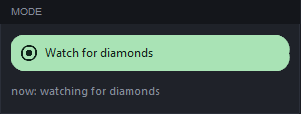
- «Diamonds» tab, «Track diamonds» modeIn the «Mode» card it's the green capsule. If one of the checks is selected instead, F8 will run that instead of buying.
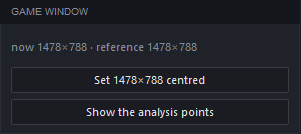
- Game window — 1478×788The bot finds the game's buttons by this size. In the «Game window» card, click «Centre at 1478×788» (or «Window 1478×788» in the top right). The line «now 1478×788 · reference 1478×788» means everything's fine. «Preview the analysis points» saves a picture of the game window with the spots the bot looks at marked on it: it shows whether they land on the buttons.
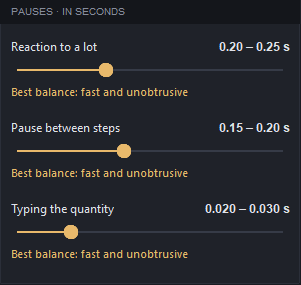
- Pauses — leave them as they are«Reaction to a lot», «Pause between steps» and «Typing the quantity» default to «Optimal: fast and inconspicuous». What they mean is further below, in «Pauses in detail».
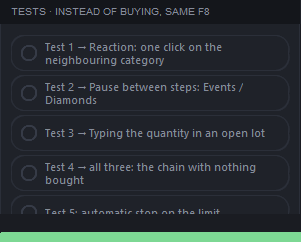
- First time — test without buyingIn the «Checks» card pick «Test 4 → all three: a dry run of the chain» and press F8: the bot runs through the whole purchase without buying anything and logs how long it took. Then switch back to «Track diamonds».
- In the game: Trading Post → I want to buy → DiamondsThe list of lots has to be visible. Move the program's window so it doesn't cover the list: the bot watches the screen and would see its own window instead of the game.
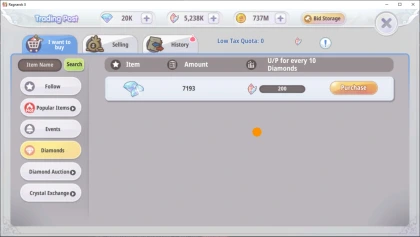
This is how it should be open in the game. - Press F8Or the green «START» at the bottom left. The button turns red — «STOP» — and the state becomes «Watching the listings». A lot appears — «Buying»: Purchase → quantity → Purchase, the log shows «bought … in … sec», and the session counter is on the right.
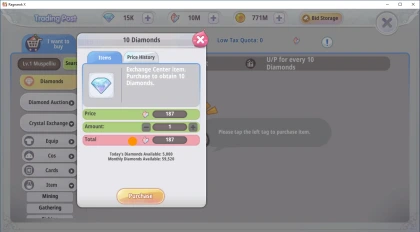
Purchase window: Purchase → Amount → Purchase. 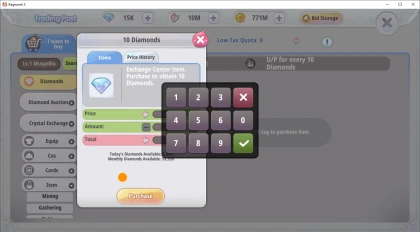
The quantity is typed one digit at a time. - While the bot is running, keep the game activeSwitch to another window and the bot pauses: «Waiting for the game to be active», with «PAUSE» on the button. Go back to the game and it carries on by itself. If Diamonds isn't selected, it waits quietly and presses nothing.
- StoppingF8 or the button. In an emergency, move the mouse cursor into a corner of the screen: the bot stops immediately. The bot reads the daily and monthly limit off the purchase screen and, once it's used up, stops by itself: «Diamond limit used up».
What you'll see in the log
14:02:11 start: tracking diamonds
14:02:12 market listings visible, Diamonds selected — watching
14:05:40 a lot appeared — buying
14:05:40 bought 300 in 0.41 sec
14:07:03 the game is not in front - paused. Go back to the game and I will carry on
The lines are illustrative — the idea is the same.
Pauses in detail
| Pause | What it sets |
|---|---|
| Reaction to a lot | how long to wait before the first click |
| Pause between steps | between Purchase, Amount and Purchase |
| Typing the quantity | how fast the digits are typed |
Above the slider both ends of the range are written — «0.15 – 0.20 sec» — and each time the bot waits a random amount of time between them: a pause that's the same to the millisecond is the most recognisable thing about automation. Below the slider is what's selected: «Highest speed, higher risk», «Optimal: fast and inconspicuous», or «Lowest risk, lower speed». «Fast» has its own sliders — the same three, but with values twice as large.
The faster the purchase, the more noticeable the program. The defaults were chosen by measurement — only touch them if you actually see a problem.
Checks in detail
A check is started with the same key instead of buying, and it doesn't buy anything.
- Test 1 → Reaction: one click on the neighbouring category
- Test 2 → Pause between steps: Events / Diamonds
- Test 3 → Typing the quantity in an open lot
- Test 4 → all three: the chain with nothing bought
- Test 5: automatic stop on the limit
Tests 1 and 2 count from the selected category — the highlighted one and its neighbour above — so Diamonds has to be selected.
If something's wrong
| What you see | What to do |
|---|---|
| «Waiting for the game to be active» | Go back to the game — the bot will carry on by itself. |
| «The category is not Diamonds» | Select Diamonds in the game. |
| «I can't see the market» | Open Trading Post → I want to buy and check the game window's size. |
| «click blocked: another window covers that point of the screen» | Move away the window sitting on top of the game. |
| «SEVERAL WINDOWS AT ONCE DON'T WORK» | Diamonds are bought in one game window at a time. |
| «emergency stop: the cursor is in the corner of the screen» | The cursor moved into a corner. Start it again. |
The «Fast» method
The bot works inside the game — through the same link to the game as the professions. It switches the Follow ↔ Diamonds tabs by itself, so the list refreshes without waiting 5 seconds. As soon as a lot appears, the bot buys it with the game's own buttons: lot row → amount → Purchase. It needs neither the mouse nor focus — the game window can be minimised.
- Choose the «Fast» method«Diamonds» tab, «Mode» card: click «Watch for diamonds» and the method choice opens. Choose «Fast»: the list folds up and the line under the card reads «now: watching for diamonds · fast». With «Fast» there are no «Game window» and «Checks» cards — it doesn't need them.
- In the game: Trading Post → I want to buyThe Follow and Diamonds tabs must be visible. After that the game window can be minimised.
- Press F8The journal shows «Fast: Follow ↔ Diamonds, pause 0.4–0.7 s…», and the tabs in the game switch by themselves. A purchase — «Bought N diamonds at P, reaction X ms». To stop — F8 again: the journal sums up how many times the list was refreshed and how much was bought.
How fast the bot presses the purchase buttons is set by the three sliders of the «Pauses» card (what each one sets is in «Pauses in detail» under «Standard»). «Fast» has its own, and every value on them is twice the «Standard» one: by default 0.40 – 0.50, 0.30 – 0.40 and 0.040 – 0.060 sec. The card shows the sliders of the chosen method; move one method's slider and the other's stays as it was. The bot types the exact amount: as much as the lot has, but no more than the remaining limit and no more than your crystals cover.
If a game window covers the market, the bot waits and presses nothing. If the Trading Post is closed, it waits too, and if it stays closed for 30 seconds in a row, it stops: «Trading Post has been closed for 30 s — stopping the fast method». If the diamond limit is used up, crystals run short or a game warning window appears, it stops by itself and says why. If a purchase step fails, the journal shows «A purchase step failed: …».
Rox Helper · guide.